
Yes. The PWA updates automatically each time you open it, provided you have an internet connection. No manual update or reinstall is ever required. You will always have the current version without doing anything.
 Welcome pack for 2 depositsGet 2 000 AUD + 100 Free Spins on slots and Live
 Loyalty ProgramEnjoy cashback, no-deposit rewards, and more
Lucky Hills App Features: What You Get and How It Works
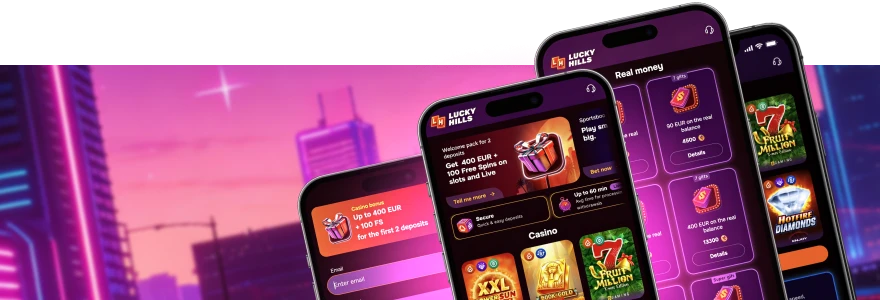
The Lucky Hills app is a Progressive Web App (PWA) — not a file you download from the App Store or Google Play, but a version of the site that installs directly to your home screen and runs like a native app. No app store approval, no storage-heavy install file. Once it’s on your device, it opens instantly, remembers your login, and gives you full access to everything on the site.
Full Install Guide for All Devices
Installing the app takes under two minutes on any device. The process differs slightly by operating system, so follow the steps for yours below.
Android
- Open Chrome and go to the Lucky Hills site.
- Tap the three-dot menu in the top-right corner.
- Select “Install App” or “Add to Home Screen.”
- Tap “Install” to confirm — the icon appears on your home screen immediately.
The Android install is the most reliable of the three options. Chrome detects the PWA automatically and prompts you if you miss the menu option.
iPhone and iPad
- Open Safari and navigate to the Lucky Hills site.
- Tap the Share button at the bottom of the screen.
- Scroll down and select “Add to Home Screen.”
- Confirm the name and tap “Add.”
Safari is the only browser on iOS that supports the Add to Home Screen function with full PWA capability. Chrome and Firefox on iPhone do not trigger the install prompt correctly, so stick with Safari.
One-Time Login and Fast Access
Once the app is installed, you log in once — and you stay logged in. The next time you open it from your home screen, you land directly in your account without re-entering your credentials. For LuckyHills mobile login, the process is the same as the browser, but the session stays active between visits so you’re not repeating the same steps every time you return.
The app opens in its own window, separate from your browser, with no address bar or tabs in view. It behaves like a standalone application. On Android and Windows, this also means the app won’t drain your browser’s memory by competing with open tabs.
Push Notifications and Bonus Alerts
With the app installed on Android or PC, you can enable push notifications. When a new promotion goes live — Wednesday Free Spins, the Sunday deposit bonus, or a cashback update — the notification comes through to your device without you needing to check the site.
This is particularly useful for time-sensitive offers. The Wednesday deal gives you up to 50 Free Spins on a deposit, and the Sunday offer goes up to a 30% bonus. Missing either means waiting another week. Push notifications remove that friction. You get the alert, open the app directly from it, and the offer is right there. Full detail on current running promotions is available on the LuckyHills casino bonuses page.
iOS push notifications for PWAs have limited support in Safari on older iPhone models. If you’re on iOS 16.4 or later, the feature works as expected.
App Performance: Speed and Stability
The PWA loads faster than a standard browser session because it caches core site files locally after the first visit. That means fewer assets need to load from the server each time you open it. On a standard 4G connection, the difference is noticeable — the app is ready in roughly half the time of a cold browser visit.
| Feature | App (PWA) | Mobile Browser |
| Load time (returning visit) | Fast — core files cached | Slower — full reload each time |
| Login required each visit | No — session persists | Yes — often required |
| Local storage use | Minimal (~2–5 MB) | No local storage |
| Updates | Automatic on open | Automatic on open |
The app handles older Android phones well, going back to Android 8. No additional RAM is consumed compared to a standard browser tab, so performance on budget handsets holds up.
What You Can Do in the App
Everything available on the full site is accessible through the app — no features are locked to desktop only. Here is what you get full access to:
- Browse and play all 7,000+ games, including slots, live casino tables, crash games, jackpots, and Megaways titles from 84 providers
- Deposit from AUD 10 and withdraw from AUD 80 using any supported payment method, including Apple Pay, Neosurf, Bitcoin, and Visa
- Claim and track active bonuses, including weekly cashback of up to 10%
- Access your VIP Club level and monitor your XP progress
- Contact support and manage account settings, including identity verification
The full Lucky Hills live casino runs without issues in the app, including tables from Evolution, SA Gaming, and Vivo Gaming. Live streams hold steady on a 4G or Wi-Fi connection with no special configuration needed.
For Aussies who prefer to install the iOS version, here are the steps again in short form:
- Open Safari on your iPhone or iPad.
- Go to the Lucky Hills site.
- Tap Share, then “Add to Home Screen.”
- Confirm and open from your home screen.
Device and System Requirements
The app runs on any device with a modern browser. No download is required beyond the initial install to your home screen. The table below outlines what you need.
| Device | Minimum OS | Recommended Browser | Recommended Connection |
| Android | Android 8.0+ | Chrome (latest) | 4G or Wi-Fi |
| iPhone / iPad | iOS 14.0+ | Safari (latest) | 4G or Wi-Fi |
| Windows PC | Windows 10+ | Chrome (latest) | Broadband or 4G |
| Mac | macOS 11+ | Chrome or Safari | Broadband or Wi-Fi |
If your device meets these specs, the app runs without any configuration. Keep your browser updated — the app draws on browser APIs that older versions handle poorly. On the payments side, the full schedule of Lucky Hills payment methods including crypto options like Tether TRC-20, Solana, and Litecoin with minimums from AUD 10, all work through the app the same as on desktop.
Install the App and Start Playing
Pick your device from the guide above, follow the steps, and you’re set. New accounts are eligible for a 100% first-deposit bonus plus 100 Free Spins on a minimum deposit of AUD 30, and the second deposit gets a 200% bonus. Both are claimable directly through the app. The full breakdown of the welcome offer is covered in the Lucky Hills casino review.
Once installed, we recommend enabling notifications so you don’t miss the mid-week and weekend offers. The app covers everything — games, banking, bonuses, account tools — without loading a browser tab. A broader look at the game library, including pokies from Yggdrasil, BGaming, and Betsoft, is available on the LuckyHills mobile pokies section of the site.
FAQ
Does the app update automatically?
How much storage does the app use on my phone?
The app uses approximately 2–5 MB of local storage after the first visit. That covers cached assets that speed up future loads. No large install file is downloaded, so it has a minimal footprint on your device.
Can I use the app on multiple devices at the same time?
Yes. Your account works across any number of devices. Log in on your phone, your tablet, and your PC simultaneously if you want. Each session is independent, though your balance and bonus status stay synced to your account in real time.
Is the Lucky Hills mobile casino the same as the desktop version?
Yes. Every section of the site — games, banking, promotions, VIP Club, account settings — is fully available through the app. Nothing is removed or restricted compared to the desktop experience. The layout adjusts to fit your screen size automatically.
Thank you! Your review has been successfully published
Write review
First deposit bonus
100% bonus + 100 Free Spins

- Max bonus:1 000 AUD
- Min deposit:30 AUD
- Wager:x40
- Win limit:3 000 AUD
- 100 FS:20 FS daily for 5 days
User reviews